
对于数据访问层,⽆论是 SQL(关系型数据库) 还是 NOSQL(⾮关系型数据库),Spring Boot 都默认采⽤整合 Spring Data 的⽅式进⾏统⼀处理,通过⼤量⾃动配置,来简化我们对数据访问层的操作,⽽如果我们要使⽤ MyBatis-Plus,只需要引⼊ MyBatis-Plus 的启动器就⾏。

概述
MyBatis-Plus (简称 MP)是⼀个 MyBatis 的增强⼯具,在 MyBatis 的基础上只做增强不做改变,为简化开发、提⾼效率⽽⽣。
愿景:我们的愿景是成为 MyBatis 最好的搭档,就像 魂⽃罗 中的 1P、2P,基友搭配,效率翻倍。

特性
- ⽆侵⼊:只做增强不做改变,引⼊它不会对现有⼯程产⽣影响,如丝般顺滑
- 损耗⼩:启动即会⾃动注⼊基本
CURD,性能基本⽆损耗,直接⾯向对象操作 - 强⼤的
CRUD操作:内置通⽤Mapper、通⽤Service,仅仅通过少量配置即可实现单表⼤部分CRUD操作,更有强⼤的条件构造器,满⾜各类使⽤需求 - ⽀持
Lambda形式调⽤:通过Lambda表达式,⽅便的编写各类查询条件,⽆需再担⼼字段写错 - ⽀持主键⾃动⽣成:⽀持多达 4 种主键策略(内含分布式唯⼀
ID⽣成器 –Sequence),可⾃由配置,完美解决主键问题 - ⽀持
ActiveRecord模式:⽀持ActiveRecord形式调⽤,实体类只需继承Model类即可进⾏强⼤的CRUD操作 - ⽀持⾃定义全局通⽤操作:⽀持全局通⽤⽅法注⼊(
Write once, use anywhere) - 内置代码⽣成器:采⽤代码或者
Maven插件可快速⽣成Mapper、Model、Service、Controller层代码,⽀持模板引擎,更有超多⾃定义配置等您来使⽤ - 内置分⻚插件:基于
MyBatis物理分⻚,开发者⽆需关⼼具体操作,配置好插件之后,写分⻚等同于普通List查询 - 分⻚插件⽀持多种数据库:⽀持
MySQL、MariaDB、Oracle、DB2、H2、HSQL、SQLite、Postgre、SQLServer等多种数据库 - 内置性能分析插件:可输出
SQL语句以及其执⾏时间,建议开发测试时启⽤该功能,能快速揪出慢查询 - 内置全局拦截插件:提供全表
delete、update操作智能分析阻断,也可⾃定义拦截规则,预防误操作
入门案例
我们将通过⼀个简单的 Demo 来阐述 MyBatis-Plus 的强⼤功能。
-
引入依赖
<dependency>
     <groupId>com.baomidou</groupId>
    <artifactId>mybatis-plus-spring-boot3-starter</artifactId>
    <version>最新版本</version>
</dependency>
<dependency>
    <groupId>com.mysql</groupId>
    <artifactId>mysql-connector-j</artifactId>
</dependency>
<dependency>
    <groupId>com.alibaba</groupId>
    <artifactId>druid-spring-boot-3-starter</artifactId>
    <version>1.2.20</version>
</dependency>
注意:要是引入
druid依赖务必版本大于1.2.19,否则会出现问题。 -
配置数据源
在
application.yml配置⽂件中添加MySQL数据库的相关配置:# DataSource Config spring: datasource: driver-class-name: com.mysql.cj.jdbc.Driver url: jdbc:mysql://localhost:3306/test type: com.alibaba.druid.pool.DruidDataSource username: root password: a123456 -
实体类
我们以经典的
Emp表作为实例,进⾏讲解,编写对应的实体Emp类。@Data public class Emp implements Serializable { private Integer empno; private String ename; private String job; private Integer mgr; private String hiredate; private Double sal; private Double comm; private Integer deptno; private Integer empstate; } -
Mapper 类
编写
mapper包下的EmpMapper接⼝。@Mapper public interface EmpMapper extends BaseMapper<Emp>{ }BaseMapper类是MyBatis-Plus框架中的一个核心接口,用于提供基本的CRUD(创建、读取、更新、删除)操作的方法定义。它通过继承MyBatis的Mapper接口并扩展了一些常用的数据库操作方法,使得开发人员可以更加便捷地进行数据访问层的开发,无需手动编写对应的SQL语句。BaseMapper接口的原理主要基于MyBatis的Mapper动态代理机制。在运行时,MyBatis-Plus会动态生成BaseMapper接口的实现类,并通过Java反射机制来调用相应的数据库操作方法。这些方法在实现时会自动生成对应的SQL语句,并利用MyBatis的SQL执行引擎来执行这些SQL语句,从而实现对数据库的CRUD操作。 -
业务类
编写
service包下的EmpService接口。@Service public interface EmpService extends IService<Emp>{ }注意:在新版本中,该接口也需要使用
@Service修饰。编写
EmpService接口的实现类EmpServiceImpl。@Service public class EmpServiceImpl extends ServiceImpl<EmpMapper,Emp> implements EmpService{ } -
测试
我们这里使用
SpringBoot自带的测试SpringBootTest来实现@SpringBootTest public class App { @Resource private EmpService service; @Test public void a() { List<Emp> list = service.list(); list.forEach(e -> { log.info("e:{}", e); }); } } -
效果
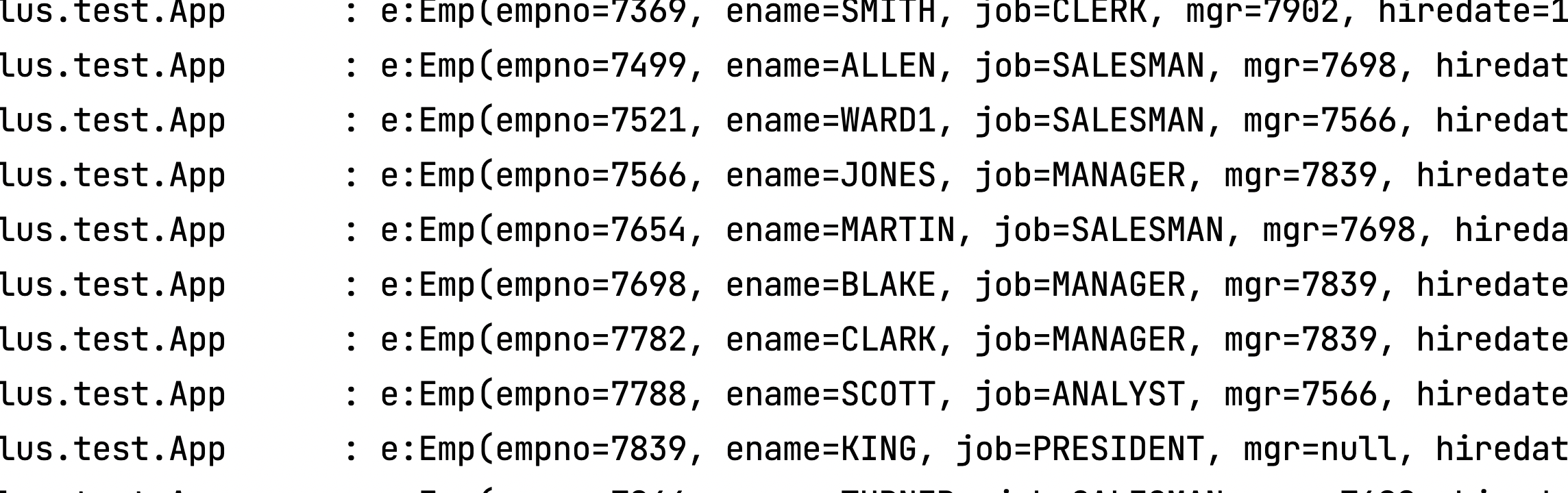
通过以上⼏个简单的步骤,我们就实现了 Emp 表的 CRUD 功能,甚⾄连 XML ⽂件都不⽤编写!
从以上步骤中,我们可以看到集成 MyBatis-Plus ⾮常的简单,只需要引⼊ starter ⼯程,并配置 mapper 扫描路径即可。
但 MyBatis-Plus 的强⼤远不⽌这些功能,想要详细了解 MyBatis-Plus 的强⼤功能?那就继续往下看吧!
通过以上几个简单的步骤,我们就实现了 Emp 表的 CRUD 功能,甚至连 XML 文件都不用编写!
从以上步骤中,我们可以看到集成 MyBatis-Plus 非常的简单,只需要引入 starter 工程,并配置 mapper 扫描路径即可。
但 MyBatis-Plus 的强大远不止这些功能,想要详细了解 MyBatis-Plus 的强大功能?那就继续往下看吧!
MyBatis-Plus 注解
介绍 Mybatis-Plus 注解包相关类详解(更多详细描述可点击查看源码注释)
@TableName
- 描述:表名注解,标识实体类对应的表
- 使用位置:实体类
@Data
@TableName(value = "emp")
public class Emp implements Serializable {
    private Integer empno;
    private String ename;
    private String job;
    private Integer mgr;
    private String hiredate;
    private Double sal;
    private Double comm;
    private Integer deptno;
    private Integer empstate;
}注意:@TableName 注解可省略,如省略对应类名的表
属性列表:
| 属性 | 类型 | 必须指定 | 默认值 | 描述 |
|---|---|---|---|---|
| value | String | 否 | “” | 表名 |
| schema | String | 否 | “” | schema |
| keepGlobalPrefix | boolean | 否 | false | 是否保持使用全局的 tablePrefix 的值(当全局 tablePrefix 生效时) |
| resultMap | String | 否 | “” | xml 中 resultMap 的 id(用于满足特定类型的实体类对象绑定) |
| autoResultMap | boolean | 否 | false | 是否自动构建 resultMap 并使用(如果设置 resultMap 则不会进行 resultMap 的自动构建与注入) |
| excludeProperty | String[] | 否 | {} | 需要排除的属性名 @since 3.3.1 |
关于 autoResultMap 的说明:
MP 会自动构建一个 resultMap 并注入到 MyBatis 里(一般用不上),请注意以下内容:
因为 MP 底层是 MyBatis,所以 MP 只是帮您注入了常用 CRUD 到 MyBatis 里,注入之前是动态的(根据您的 Entity 字段以及注解变化而变化),但是注入之后是静态的(等于 XML 配置中的内容)。
而对于 typeHandler 属性,MyBatis 只支持写在 2 个地方:
- 定义在 resultMap 里,作用于查询结果的封装
- 定义在
insert和update语句的#{property}中的property后面(例:#{property,typehandler=xxx.xxx.xxx}),并且只作用于当前设置值
除了以上两种直接指定 typeHandler 的形式,MyBatis 有一个全局扫描自定义 typeHandler 包的配置,原理是根据您的 property 类型去找其对应的 typeHandler 并使用。
@TableId
- 描述:主键注解
- 使用位置:实体类主键字段
@Data
@TableName(value = "emp")
public class Emp implements Serializable {
    @TableId(value = "empno",type = IdType.AUTO)
    private Integer empno;
    // 其他省略
}
属性列表:
| 属性 | 类型 | 必须指定 | 默认值 | 描述 |
|---|---|---|---|---|
| value | String | 否 | “” | 主键字段名 |
| type | Enum | 否 | IdType.NONE | 指定主键类型 |
type属性概述:
| 值 | 描述 |
|---|---|
| AUTO | 数据库 ID 自增 |
| NONE | 无状态,该类型为未设置主键类型(注解里等于跟随全局,全局里约等于 INPUT) |
| INPUT | insert 前自行 set 主键值 |
| ASSIGN_ID | 分配 ID(主键类型为 Number(Long 和 Integer)或 String)(since 3.3.0),使用接口IdentifierGenerator的方法nextId(默认实现类为DefaultIdentifierGenerator雪花算法) |
| ASSIGN_UUID | 分配 UUID,主键类型为 String(since 3.3.0),使用接口IdentifierGenerator的方法nextUUID(默认 default 方法) |
| ID_WORKER | 分布式全局唯一 ID 长整型类型(please use ASSIGN_ID) |
| UUID | 32 位 UUID 字符串(please use ASSIGN_UUID) |
| ID_WORKER_STR | 分布式全局唯一 ID 字符串类型(please use ASSIGN_ID) |
@TableField
描述:字段注解(非主键)
@Data
@TableName(value = "emp")
public class Emp implements Serializable {
    @TableField(value = "ename")
    private String ename;
    @TableField(value = "hiredate")
    private String hireDate;
    // 其他省略
}
属性列表:
| 属性 | 类型 | 必须指定 | 默认值 | 描述 |
|---|---|---|---|---|
| value | String | 否 | “” | 数据库字段名 |
| exist | boolean | 否 | true | 是否为数据库表字段 |
| condition | String | 否 | “” | 字段 where 实体查询比较条件,有值设置则按设置的值为准,没有则为默认全局的 %s=#{%s},参考(opens new window) |
| update | String | 否 | “” | 字段 update set 部分注入,例如:当在version字段上注解update="%s+1" 表示更新时会 set version=version+1 (该属性优先级高于 el 属性) |
| insertStrategy | Enum | 否 | FieldStrategy.DEFAULT | 举例:NOT_NULL insert into table_a(<if test="columnProperty != null">column</if>) values (<if test="columnProperty != null">#{columnProperty}</if>) |
| updateStrategy | Enum | 否 | FieldStrategy.DEFAULT | 举例:IGNORED update table_a set column=#{columnProperty} |
| whereStrategy | Enum | 否 | FieldStrategy.DEFAULT | 举例:NOT_EMPTY where <if test="columnProperty != null and columnProperty!=''">column=#{columnProperty}</if> |
| fill | Enum | 否 | FieldFill.DEFAULT | 字段自动填充策略 1. DEFAULT:默认不处理 2. INSERT:插入时填充字段 3. UPDATE:更新时填充字段 4. DELETE:删除时填充字段 |
| select | boolean | 否 | true | 是否进行 select 查询 |
| keepGlobalFormat | boolean | 否 | false | 是否保持使用全局的 format 进行处理 |
| jdbcType | JdbcType | 否 | JdbcType.UNDEFINED | JDBC 类型 (该默认值不代表会按照该值生效) |
| typeHandler | Class | 否 | UnknownTypeHandler.class | 类型处理器 (该默认值不代表会按照该值生效) |
| numericScale | String | 否 | “” | 指定小数点后保留的位数 |
关于
jdbcType和typeHandler以及numericScale的说明:numericScale只生效于 update 的 sql. jdbcType和typeHandler如果不配合@TableName#autoResultMap = true一起使用,也只生效于 update 的 sql. 对于typeHandler如果你的字段类型和 set 进去的类型为equals关系,则只需要让你的typeHandler让 Mybatis 加载到即可,不需要使用注解。
@TableLogic
描述:表字段逻辑处理注解(逻辑删除)
| 属性 | 类型 | 必须指定 | 默认值 | 描述 |
|---|---|---|---|---|
| value | String | 否 | “” | 逻辑未删除值 |
| delval | String | 否 | “” | 逻辑删除值 |
逻辑删除
我们在实际使用中的删除操作,其实并没有删除表中的数据,仅仅是将表的数据 隐藏 掉,查询时不查询这些 隐藏 的数据。
分类
- 全局方式
- 局部方式
全局方式
在 application.yml 中进行配置:
mybatis-plus:
  global-config:
    db-config:
      logic-delete-field: state # 全局逻辑删除的实体字段名
      logic-delete-value: 0 # 逻辑已删除值(默认为 1)
      logic-not-delete-value: 1 # 逻辑未删除值(默认为 0)
注意:配置好后,所有实体不需额外操作,但必须保证存在 state 字段。
局部方式
需要在每个所需实体类中引入 @TableLogic 注解。
@TableLogic(delval='0',value='1')
private Integer empState;
说明
只对自动注入的 sql 起效:
- 插入: 不作限制
- 查找: 追加 where 条件过滤掉已删除数据,如果使用 wrapper.entity 生成的 where 条件也会自动追加该字段
- 更新: 追加 where 条件防止更新到已删除数据,如果使用 wrapper.entity 生成的 where 条件也会自动追加该字段
- 删除: 转变为 更新
例如:
- 删除:
update user set deleted=1 where id = 1 and deleted=0 - 查找:
select id,name,deleted from user where deleted=0
字段类型支持说明:
- 支持所有数据类型(推荐使用 Integer,Boolean,LocalDateTime)
- 如果数据库字段使用 datetime ,逻辑未删除值和已删除值支持配置为字符串null,另一个值支持配置为函数来获取值如now()
附录:
- 逻辑删除是为了方便数据恢复和保护数据本身价值等等的一种方案,但实际就是删除。
- 如果你需要频繁查出来看就不应使用逻辑删除,而是以一个状态去表示。
自动填充功能
在数据表的设计中,经常需要加一些字段,如:创建时间,最后修改时间等,此时可以使用 MyBatis-Plus 来帮我们进行自动维护。
填充方式
自动填充方式有两种,分别是:
- 通过数据库完成自动填充
- 使用程序完成自动填充
数据库自动填充
这里没什么好说的,就是正常书写就行,在添加时,有默认值的列所对应的属性不赋值,数据库会自动赋予默认值。
程序自动填充
public class Emp {

    // 注意!这里需要标记为填充字段
    @TableField(.. fill = FieldFill.INSERT)
    private String hireDate;

    ....
}
这里就给 hireDate 属性设置了自动填充,如果该属性没有值,则自动填充 Null 。
测试类:
@Test
void saveTest(){
    Emp emp = new Emp();
    emp.setComm(21400.3);
    emp.setEname("关为");
    empService.save(emp);
}效果:

改进
改进刚才的内容,我们想要在未给 hireDate 属性赋值时,系统赋予当前时间。
这时我们要引入自定义实现类 MyMetaObjectHandler
@Slf4j
@Component
public class NowDateHandler implements MetaObjectHandler {
    @Override
    public void insertFill(MetaObject metaObject) {
        log.info("start insert fill ....");
        this.strictInsertFill(metaObject, "hireDate", () -> getNowDate(), String.class);
    }
    @Override
    public void updateFill(MetaObject metaObject) {
        log.info("start update fill ....");
        this.strictInsertFill(metaObject, "hireDate", () -> getNowDate(), String.class);
    }
    private String getNowDate() {
        SimpleDateFormat sdf = new SimpleDateFormat("yyyy-MM-dd HH:mm:ss");
        return sdf.format(new Date());
    }
}
这时候的效果:

说明
- 填充原理是直接给
entity的属性设置值!!! - 注解则是指定该属性在对应情况下必有值,如果无值则入库会是
null MetaObjectHandler提供的默认方法的策略均为:如果属性有值则不覆盖,如果填充值为null则不填充- 字段必须声明
TableField注解,属性fill选择对应策略,该声明告知Mybatis-Plus需要预留注入SQL字段 - 填充处理器
NowDateHandler在Spring Boot中需要声明@Component或@Bean注入 - 要想根据注解
FieldFill.xxx和字段名以及字段类型来区分必须使用父类的strictInsertFill或者strictUpdateFill方法 - 不需要根据任何来区分可以使用父类的
fillStrategy方法 update(T t,Wrapper updateWrapper)时t不能为空,否则自动填充失效
MD5 数据加密
MD5 信息摘要算法(英语:MD5 Message-Digest Algorithm),一种被广泛使用的密码散列函数,可以产生出一个128位(16字节)的散列值(hash value),用于确保信息传输完整一致。MD5 由美国密码学家罗纳德·李维斯特设计,于1992年公开,用以取代 MD4 算法。这套算法的程序在 RFC 1321 标准中被加以规范。1996年后该算法被证实存在弱点,可以被加以破解,对于需要高度安全性的数据,专家一般建议改用其他算法,如 SHA-2。2004年,证实 MD5 算法无法防止碰撞,因此不适用于安全性认证,如 SSL 公开密钥认证或是数字签名等用途。
public static String encryptMD5(String input) {
        try {
        // 创建MD5加密对象
        MessageDigest md = MessageDigest.getInstance("MD5");
        // 执行加密操作
        byte[] messageDigest = md.digest(input.getBytes());
        // 将字节数组转换为16进制字符串
        StringBuilder hexString = new StringBuilder();
            for (byte b : messageDigest) {
            String hex = Integer.toHexString(0xff & b);
            if (hex.length() == 1) {
                hexString.append('0');
            }
            hexString.append(hex);
        }
        // 返回加密后的字符串
        return hexString.toString();
    } catch (NoSuchAlgorithmException e) {
        throw new RuntimeException(e);
    }
}
分页操作
MyBatis-Plus 的分页插件 PaginationInnerInterceptor 提供了强大的分页功能,支持多种数据库,使得分页查询变得简单高效。
引入依赖
<dependency>
    <groupId>com.baomidou</groupId>
    <artifactId>mybatis-plus-jsqlparser</artifactId>
    <version>3.5.12</version>
</dependency>
配置方法
在 Spring Boot 项目中,你可以通过 Java 配置来添加分页插件:
@Configuration
public class MyBatisConfig {
    @Bean
    public MybatisPlusInterceptor mybatisPlusInterceptor(){
        // 初始化 MybatisPlusInterceptor 核心插件
        MybatisPlusInterceptor interceptor = new MybatisPlusInterceptor();
        // 添加自动分页插件 PaginationInnerInterceptor
        interceptor.addInnerInterceptor(new PaginationInnerInterceptor());
        // 返回
        return interceptor;
    }
}
属性介绍
PaginationInnerInterceptor 提供了以下属性来定制分页行为:
| 属性名 | 类型 | 默认值 | 描述 |
|---|---|---|---|
| overflow | boolean | false | 溢出总页数后是否进行处理 |
| maxLimit | Long | 单页分页条数限制 | |
| dbType | DbType | 数据库类型 | |
| dialect | IDialect | 方言实现类 |
建议单一数据库类型的均设置 dbType
具体方法
你可以通过以下方式在 Mapper 方法中使用分页:
IPage<UserVo> selectPageVo(IPage<?> page, Integer state);
// 或者自定义分页类
MyPage selectPageVo(MyPage page);
// 或者返回 List
List<UserVo> selectPageVo(IPage<UserVo> page, Integer state);
例如:
public JsonResult findUser(int page) {
    QueryWrapper<User> wrapper = new QueryWrapper<>();
    // p:分页数据(总条数 总页数。。。)
    Page<User> p = Page.of(page, 10);
    // list:查询的这一页数据结果
    List<User> list = list(p, wrapper);
    p.setRecords(list);
    return ResultTool.success(p);
}
常见属性
以下是 Page 类的常见属性:
| 属性名 | 类型 | 默认值 | 描述 |
|---|---|---|---|
| records | List | ||
| emptyList | 查询数据列表 | ||
| total | Long | 0 | 查询列表总记录数 |
| size | Long | 10 | 每页显示条数,默认 10 |
| current | Long | 1 | 当前页 |
| orders | List | ||
| emptyList | 排序字段信息 | ||
| optimizeCountSql | boolean | true | 自动优化 COUNT SQL |
| optimizeJoinOfCountSql | boolean | true | 自动优化 COUNT SQL 是否把 join 查询部分移除 |
| searchCount | boolean | true | 是否进行 count 查询 |
| maxLimit | Long | 单页分页条数限制 | |
| countId | String | XML 自定义 count 查询的 statementId |
条件构造器
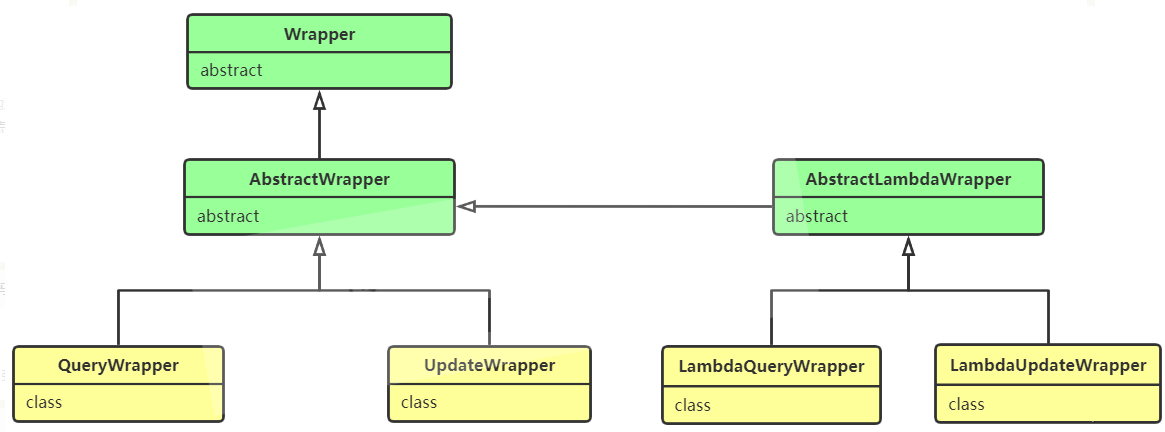
在Mybatis-Plus中提了构造条件的类 Wrapper ,它可以根据自己的意图定义我们需要的条件。Wrapper 是一个抽象类,一般情况下我们用它的子类 QueryWrapper 来实现自定义条件查询。
API
| 方法名 | 说明 | 用法实例 | 等价SQL |
|---|---|---|---|
| allEq(Map params) | 全部等于 | map.put(“id”,“3”);map.put(“user_name”,“IT可乐”);allEq(map) | user_name = “IT可乐” AND id = 3 |
| eq(R column, Object val) | 等于 = | eq(“id”,“3”) | id = 3 |
| ne(R column, Object val) | 不等于 | ne(“id”, “3”) | id 3 |
| gt(R column, Object val) | 大于 > | gt(“user_age”,“18”)user_age > 18 | user_age > 18 |
| ge(R column, Object val) | 大于等于 >= | ge(“user_age”,“18”) | user_age >= 18 |
| lt(R column, Object val) | 小于 < | lt(“user_age”,“18”) | user_age < 18 |
| le(R column, Object val) | 小于等于 <= | le(“user_age”,“18”) | user_age <= 18 |
| between(R column, Object val1, Object val2) | BETWEEN 值1 AND 值2 | between(“user_age”,“18”,“25”) | user_age BETWEEN 18 AND 25 |
| notBetween(R column, Object val1, Object val2) | NOT BETWEEN 值1 AND 值2 | notBetween(“user_age”,“18”,“25”) | user_age NOT BETWEEN 18 AND 25 |
| like(R column, Object val) | LIKE ‘%值%’ | like(“user_name”,“可乐”) | like ‘%可乐%’ |
| notLike(R column, Object val) | NOT LIKE ‘%值%’ | notLike(“user_name”,“可乐”) | not like ‘%可乐%’ |
| likeLeft(R column, Object val) | LIKE ‘%值’ | likeLeft(“user_name”,“可乐”) | like ‘%可乐’ |
| likeRight(R column, Object val) | LIKE ‘值%’ | likeRight(“user_name”,“可乐”) | like ‘可乐%’ |
| isNull(R column) | 字段 IS NULL | isNull(“user_name”) | user_name IS NULL |
| isNotNull(R column) | 字段 IS NOT NULL | isNotNull(“user_name”) | user_name IS NOT NULL |
| in(R column, Collection value) | 字段 IN (value.get(0), value.get(1), …) | in(“user_age”,{1,2,3}) | user_age IN (?,?,?) |
| notIn(R column, Collection value) | 字段 NOT IN (value.get(0), value.get(1), …) | notIn(“user_age”,{1,2,3}) | user_age NOT IN (?,?,?) |
| inSql(R column, String inValue) | 字段 IN ( sql语句 ) | inSql(“id”,“select id from user”) | id IN (select id from user) |
| notInSql(R column, String inValue) | 字段 NOT IN ( sql语句 ) | notInSql(“id”,“select id from user where id > 2”) | id NOT IN (select id from user where id > 2 |
| groupBy(R… columns) | 分组:GROUP BY 字段, … | groupBy(“id”,“user_age”) | GROUP BY id,user_age |
| orderByAsc(R… columns) | 排序【升序】:ORDER BY 字段, … ASC | orderByAsc(“id”,“user_age”) | ORDER BY id ASC,user_age ASC |
| orderByDesc(R… columns) | 排序【降序】:ORDER BY 字段, … DESC | orderByDesc(“id”,“user_age”) | ORDER BY id DESC,user_age DESC |
| orderBy(boolean condition, boolean isAsc, R… columns) | ORDER BY 字段, … | orderBy(true,true,“id”,“user_age”) | ORDER BY id ASC,user_age ASC |
| having(String sqlHaving, Object… params) | HAVING ( sql语句 ) | having(“sum(user_age)>{0}”,“25”) | HAVING sum(user_age)>25 |
| or() | 拼接 OR | eq(“id”,1).or().eq(“user_age”,25) | id = 1 OR user_age = 25 |
| and(Consumerconsumer) | AND 嵌套 | and(i->i.eq(“id”,1).ne(“user_age”,18)) | id = 1 AND user_age 25 |
| nested(Consumerconsumer) | 正常嵌套 不带 AND 或者 OR | nested(i->i.eq(“id”,1).ne(“user_age”,18)) | id = 1 AND user_age 25 |
| apply(String applySql, Object… params) | 拼接 sql(不会有SQL注入风险) | apply(“user_age>{0}”,“25 or 1=1”) | user_age >‘25 or 1=1’ |
| last(String lastSql) | 拼接到 sql 的最后,多次调用以最后一次为准(有sql注入的风险) | last(“limit 1”) | limit 1 |
| exists(String existsSql) | 拼接 EXISTS ( sql语句 ) | exists(“select id from user where user_age = 1”) | EXISTS (select id from user where user_age = 1) |
AbstractWrapper
说明:
QueryWrapper(LambdaQueryWrapper) 和 UpdateWrapper(LambdaUpdateWrapper) 的父类 用于生成 sql 的 where 条件, entity 属性也用于生成 sql 的 where 条件 注意: entity 生成的 where 条件与 使用各个 api 生成的 where 条件没有任何关联行为
QueryWrapper
说明:
继承自 AbstractWrapper ,自身的内部属性 entity 也用于生成 where 条件 及 LambdaQueryWrapper, 可以通过 new QueryWrapper().lambda() 方法获取
select
select(String... sqlSelect)
select(Predicate<TableFieldInfo> predicate)
select(Class<T> entityClass, Predicate<TableFieldInfo> predicate)-
设置查询字段
说明:
以上方法分为两类. 第二类方法为:过滤查询字段(主键除外),入参不包含 class 的调用前需要
wrapper内的entity属性有值! 这两类方法重复调用以最后一次为准 -
例:
select("id", "name", "age") -
例:
select(i -> i.getProperty().startsWith("test"))
UpdateWrapper
说明:
继承自
AbstractWrapper,自身的内部属性entity也用于生成 where 条件 及LambdaUpdateWrapper, 可以通过new UpdateWrapper().lambda()方法获取!
set
set(String column, Object val)
set(boolean condition, String column, Object val)SQLSET字段- 例:
set("name", "老李头") - 例:
set("name", "")—>数据库字段值变为空字符串 - 例:
set("name", null)—>数据库字段值变为null
setSQL
setSql(String sql)- 设置 SET 部分 SQL
- 例:
setSql("name = '老李头'")
使用 XML 配置
有的时候对于一些复杂 SQL 语句,尤其是动态 SQL,使用注解比较麻烦,我们可以通过 XML 来书写。
application.yml 引入
mybatis-plus:
  mapper-locations: classpath*:/mapper/**Mapper.xml # mapper 文件位置
根据接口生成xml配置文件
<?xml version="1.0" encoding="UTF-8" ?>
<!DOCTYPE mapper PUBLIC "-//mybatis.org//DTD Mapper 3.0//EN"
"http://mybatis.org/dtd/mybatis-3-mapper.dtd" >
<mapper namespace="com.dailyblue.java.spring.boot.mapper.EmpMapper">
    <select id="list" resultType="com.dailyblue.java.spring.boot.bean.Emp">
        select * from emp where empstate=1
        </select>
</mapper>
application.yml
# MybatisPlus
mybatis-plus:
  global-config:
    db-config:
      column-underline: true # 驼峰形式
      logic-delete-field: isDeleted # 全局逻辑删除的实体字段名
      logic-delete-value: 1 # 逻辑已删除值(默认为 1)
      logic-not-delete-value: 0 # 逻辑未删除值(默认为 0)
      db-type: mysql
      id-type: assign_id # id策略
      table-prefix: t_ # 配置表的默认前缀
  mapper-locations: classpath*:/mapper/**Mapper.xml # mapper 文件位置
  type-aliases-package: com.dailyblue.java.mybatis.bean # 实体类别名
  config-location: classpath*:/config.xml # config.xml 文件位置
  configuration:
    log-impl: org.apache.ibatis.logging.stdout.StdOutImpl # 日志:打印sql 语句
    map-underscore-to-camel-case: false # 驼峰自动转换
So,I like it